The calorie tracker for people who've quit calorie trackers.
Snap a photo of your meal. Snapkin works out the calories and protein.
One photo. Sometimes one question. That is all you do.
After the photo, the app does the rest.
Take the photo
Snapkin names what is on the plate. It works out portion sizes from the plate and the knife and fork next to it. It also counts the cooking fat and sauce most trackers miss.
Pan-fried, or baked? ±90 kcal
Answer a question, maybe
Sometimes one detail would change the number. Then it asks you. It also tells you how much the answer matters. Tap an answer, or tap "I do not know". You get an estimate either way.
Look at the protein
The calories and macros are added to your day. You see them next to your own targets. Nothing to confirm, nothing to save. Next meal, same photo.
We'll do the rest. You just have to take the photo.
Photograph the plate. Everything else on this list is Snapkin's job.
Log a meal by photographing it
No scale, no barcode, no database. Point the phone at the plate. The meal is logged before you pick up your fork.
Read moreRepeat a past meal in a few taps
Snapkin keeps every meal you log. Tap plus, then Usual meal, and your likely meals are waiting. No photo needed.
Read moreProtein gets the big dial
Protein is the one number you try to reach. Carbs and fat are numbers you stay under. Build the plate around protein, and the other two usually end up about right.
Read moreThe dial on your home screen
Two widget sizes, on iPhone and Android. The protein ring is there every time you pick up the phone. It updates when the app has your meal, not on a timer.
Read moreIt remembers your kitchen
When your answers show a habit, it becomes one sentence you can read and delete. After a few weeks, your usual food gets logged without questions.
Read moreTested against 500 weighed meals
On a typical meal, Snapkin was within 17% of a kitchen scale. Every ingredient shows what it assumed, so you can check it.
Read moreYour weight arrives on its own
Snapkin reads it from Apple Health or Health Connect. Your scale already puts it there. Nothing to type, and no account to link.
Read moreIt works in your language and around your diet
Ten languages, and not only the buttons. The questions about your meal are in your language. So are the things it remembers, and the coach. It also asks once what you do not eat, and remembers.
Read moreThere is more to it than that
Answers can be undone
Changed your mind? Undo the last answer or correction. Then the one before it.
A minimum for protein, a limit for the rest
Protein is a minimum to reach. Calories, carbs and fat are limits to stay under. The dials know the difference. Going over on protein is good news, not a warning.
Works without signal
Photograph the meal anyway. It waits on your phone. It uploads the next time you open the app with a signal.
Not sure what to eat next? Ask Snapkin.
Snapkin knows your calorie target. It knows what you have already eaten today. There are three ways to ask what to eat next. All three answer with real food and real numbers, not vague advice.
Ask for an idea
Say you have 600 calories and 40 grams of protein left, and no idea what to eat. Snapkin names ordinary meals that fit, and shows the calories and protein beside each one.
Photograph your fridge
Take up to three photos: the fridge, the freezer, a cupboard. Snapkin only suggests food it can see in the photos. It also tells you what it could not read.
Photograph the restaurant menu
Snapkin works out the calories for every dish on the menu. It keeps the menu's own courses. It puts the lightest dishes first. It ticks the ones that still fit your day.
A shelf or a menu is further from the camera than a plate. So those numbers are rougher. Snapkin says so on screen, every time. See the screen
You did not fail the last five trackers. They asked too much.
They all work, technically. Then a busy day comes. You cannot face weighing rice again. Tracking has to be easy, or it stops. So Snapkin took the work away. It does not ask you for more discipline.
Snapkin
- Take a photo.
- Look at the protein.
A restaurant plate, home cooking, a packet, a nutrition label. Photograph it, and Snapkin works out the numbers. For a closer estimate, add more photos, like the ingredients before they go in the pan.
Every other tracker
- Weigh every ingredient, including the oil
- Scan the barcode, if there is one
- Search a database with fourteen kinds of oatmeal
- Build the recipe, portion the recipe, save the recipe
- Quit by week two
€9.99 a month or €99.99 €49.99 a year, via the app. Cancel at any time.launch price, for a limited time
Other trackers do 10 things. Snapkin does one.
Water, sleep, workouts, vitamins, habits, mood. Each one is another tab and another form to fill in. Snapkin tracks food. Your weight and steps come in from your phone on their own.
What Snapkin tracks
Food
One thing to build, one thing to get right, and one screen with nothing else on it.
What the others ask you to track
- Food
- Recipes
- Workouts
- Water
- Sleep
- Vitamins
- Supplements
- Habits
- Mood
- Fasting
All the work goes into reading your plate
Naming what is on it. Working out the portion from the fork next to it. Counting the oil it was fried in. That is the hard part, so it is all we work on.
Nothing else to learn
No tabs you never open. No section that is only there because another app had one. No setting to find before the app is useful. Your day, your meals, and the camera.
These are screens from the app itself, not a mockup.
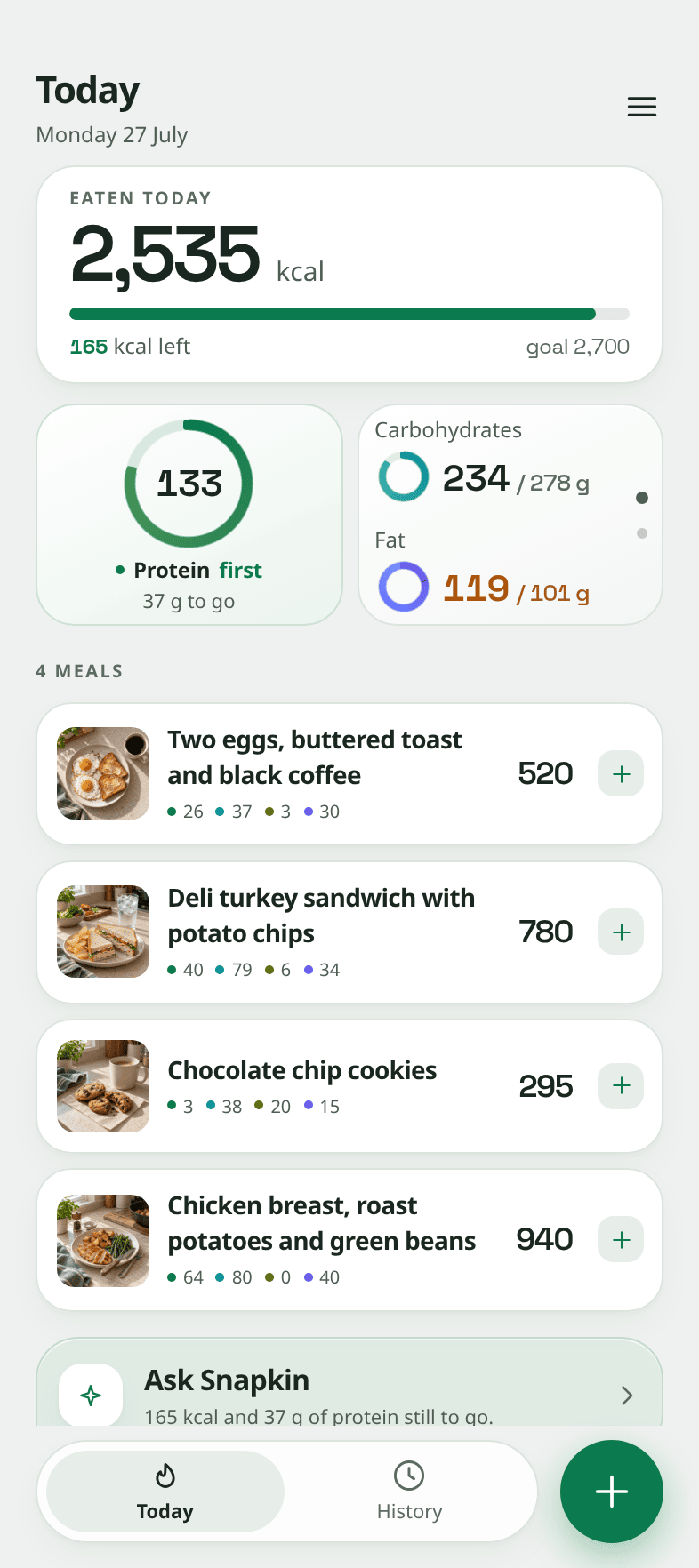
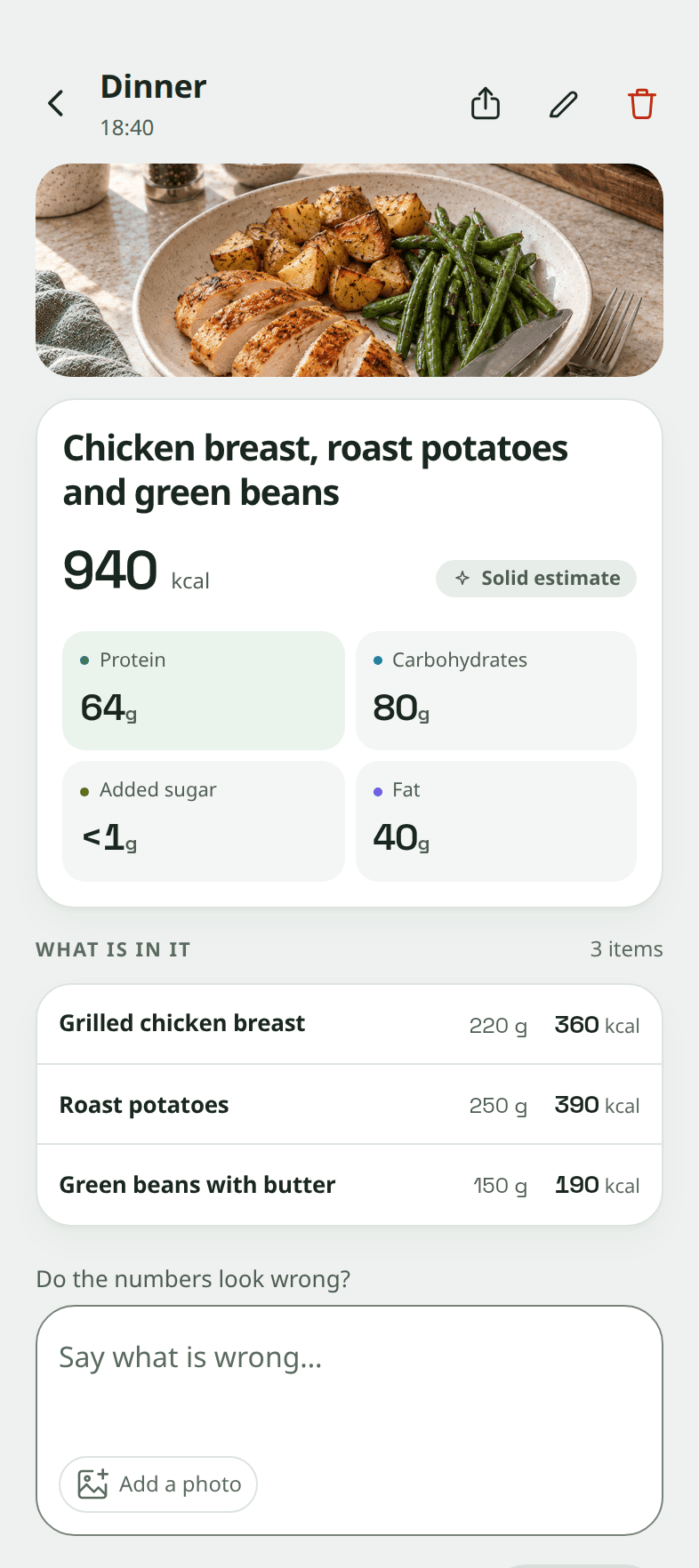
Every decision in the app is backed by research. We also show the research against it.
Is a photo good enough? Why does protein come first? What counts as added sugar? What gets a reward? Each one is written out in public, with the evidence for and the evidence against.
This is the research behind every claim the app makes. Each page names the studies for and against a decision. If the evidence is weak, or a number makes us look bad, it says so.
Read the researchIn English only, on purpose. If a computer translated a medical claim into ten languages, that would be ten chances to get one wrong.
The things people ask before they install it.
Mostly some version of "yes, but does it actually work".
How accurate is a calorie estimate from a photo?
Accurate enough to track with. We tested Snapkin on 500 meals that were weighed on a scale. On a typical meal photographed with a phone, it was within 17% of the scale. Over a simulated week of meals, it was within 10%. A year ago, AI models were not this good: published tests found them 23 to 36% out on average. We think today's models are good enough. A photo still cannot show everything, like the oil in the pan. So Snapkin shows what it assumed, and you can correct it.
Do I have to weigh my food or scan barcodes?
No. There is no scale, no barcode scanner and no food database to search. You photograph the plate. Snapkin works out the size of each portion from the plate and the knife and fork next to it. If you know a weight, you can type it in the meal chat. Snapkin will use it.
Does it work with restaurant food and home cooking?
Both. That is the point. A barcode cannot help with a restaurant plate or home cooking. Photograph a restaurant plate, a home-cooked dinner, a packet, a nutrition label, or half a leftover pizza. You can add several photos of the same meal. Want a more precise estimate? Also photograph the ingredients before they go in the pan.
Why does Snapkin put protein first?
Protein is the one number you try to reach. Carbs and fat are numbers you stay under. Protein also shapes the rest of your day. It keeps you full through the afternoon, longer than carbs or fat do. It protects your muscle while you lose weight. And if you build a plate around it, the other two usually end up about right. So protein gets the big dial. Carbs and fat get smaller ones.
How much does Snapkin cost, and is there a free version?
One subscription, monthly or yearly. The App Store or Google Play takes the payment. Tax is included in the price. It is the same price everywhere in the euro zone, whatever your country's tax rate. Outside the euro zone the store charges a local price in your own currency. It shows you the exact amount before you confirm. The monthly plan starts with three free days. After that it is paid, unless you cancel. The yearly plan is paid up front and costs less overall. There is no free version and nothing extra to pay later. Cancel in the store any time.
During the launch the yearly plan is €99.99 €49.99 a year. Subscribe now and you keep that price for as long as you stay subscribed.
What languages is the app in?
The same ten as this page: English, Chinese, Hindi, Spanish, French, Bengali, Portuguese, Indonesian, German and Dutch. Pick one in Settings. Then everything the app says to you is in that language: the questions about a meal, the things it remembers about your kitchen, and the coach. What was written before you switch stays in the old language.
Does it work without an internet connection?
Yes. Photograph the meal anyway. It waits on your phone. It uploads the next time you open the app with a signal. So a restaurant with no signal, or a flight, does not leave a gap in your day.
What happens if I do not answer its questions?
Nothing breaks. Every question is optional. "I do not know" is always a choice. The meal is on your day from the moment you take the photo. An answer only makes the estimate more precise. You can undo any answer.
Does it get better the more I use it?
Yes. In week one it asks a lot, because it does not know your kitchen yet. When your answers show a habit, it writes it down as a sentence. You can read it and delete it. After a few weeks, your usual food gets logged without questions. What it remembers never wins over what is in the photo. A label in the photo comes first. Then what it can see on the plate. Then what you typed about this meal. Only then what it remembers.
Do I have to track forever?
No. Needing it less over time is the point. The goal is to learn what is in your food, until you can judge it yourself. Most people can after a few months. If you stop opening the app because you no longer need it, it has done its job.
What happens to my food photos and my data?
The privacy policy says exactly what is stored, who else sees it and how long it is kept. You can delete your account and everything in it from inside the app. It is removed right away. You do not have to ask anybody. If you cannot sign in, you can ask for it on the delete-account page.
Next time you eat something, take a photo.
It's that simple. It keeps working through restaurants, holidays and busy weeks. There is nothing else to keep up with.
€9.99 a month or €99.99 €49.99 a year, via the app. Cancel at any time.launch price, for a limited time