Step on the scale. That is the whole of it.
Snapkin reads your weight out of Apple Health and Health Connect. Nearly every smart scale sold writes to one of those two, so yours almost certainly works already, with nothing to link and nothing to type.
€14.99 a month, or €99.99 a year. Three days free to start, no free version, nothing extra to pay later. The App Store or Google Play takes the payment. It shows you the price and tax for your country before you confirm.
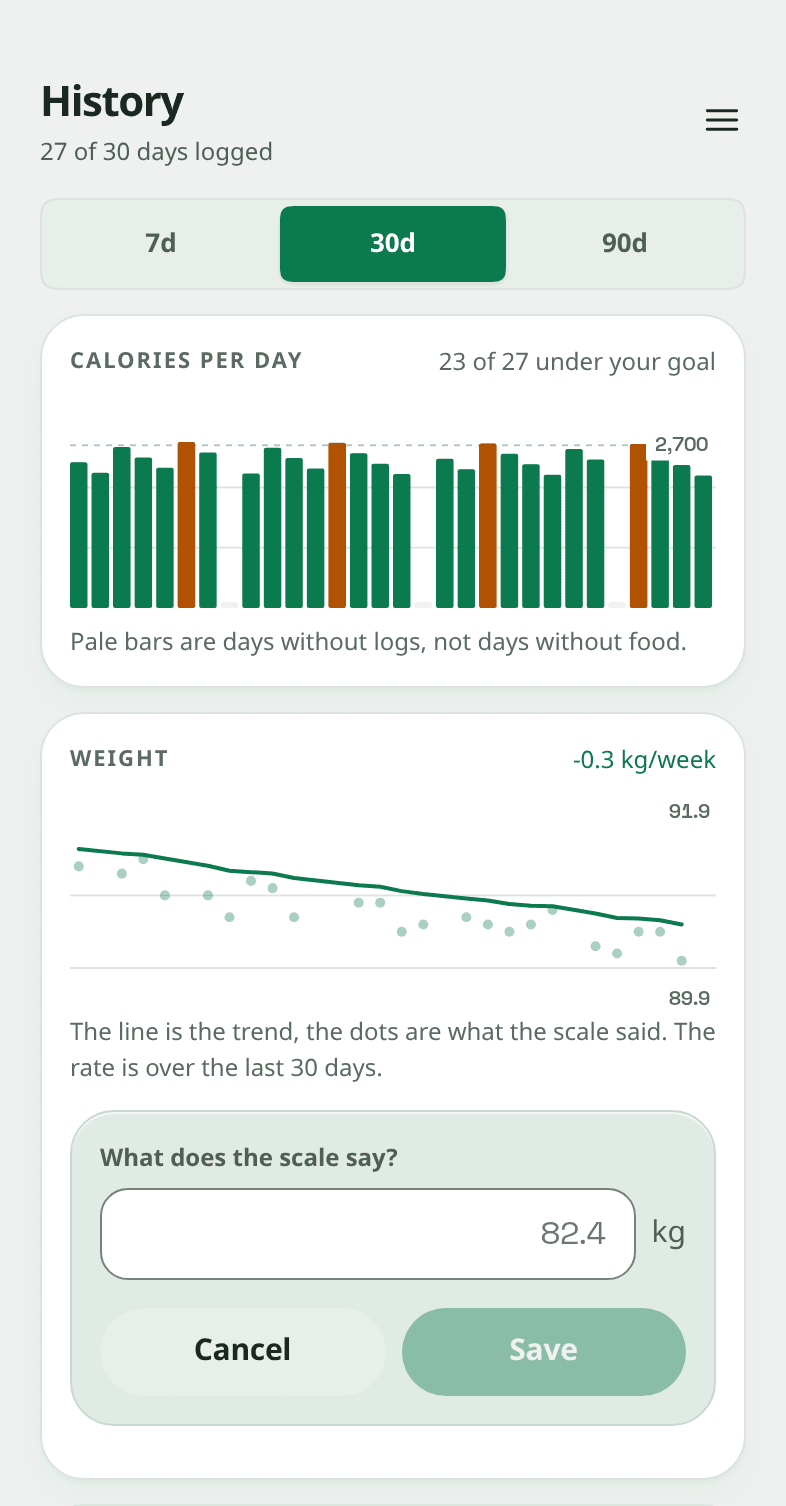
Your scale already writes your weight to your phone. Snapkin reads it from there.
There is no Snapkin account on your scale, and there does not need to be one. Your scale's own app already puts your weight into Apple Health or Health Connect, and that is the part you have set up. Snapkin picks it up from there.
Snapkin only reads. It has no permission to write to Apple Health or Health Connect, and it never asks for one. Your meals, your calories and everything Snapkin works out about them stay on your side. The only thing that moves is your last thirty days of weighings, coming in, each time you open the app.
Scales that already work
Nobody had to make a deal to be on this list, and it is not a list we keep up. If your scale's app writes weight to Apple Health or Health Connect, Snapkin reads it, and they all do.
Your scale not shown here? It very probably still works. Eufy, Renpho, Etekcity, Tanita, Beurer, Amazfit, and whatever was in the supermarket last week. The question is never the brand, it is whether its app has the Apple Health or Health Connect switch, and almost all of them do. A scale with no app at all is the only one that cannot: type those in, which takes about four seconds.
Every logo here belongs to the company that owns it. None of them has any arrangement with Snapkin and none of them is endorsing it. They are on this page for one reason: their app writes to Apple Health or Health Connect, and that is the whole of what Snapkin needs.
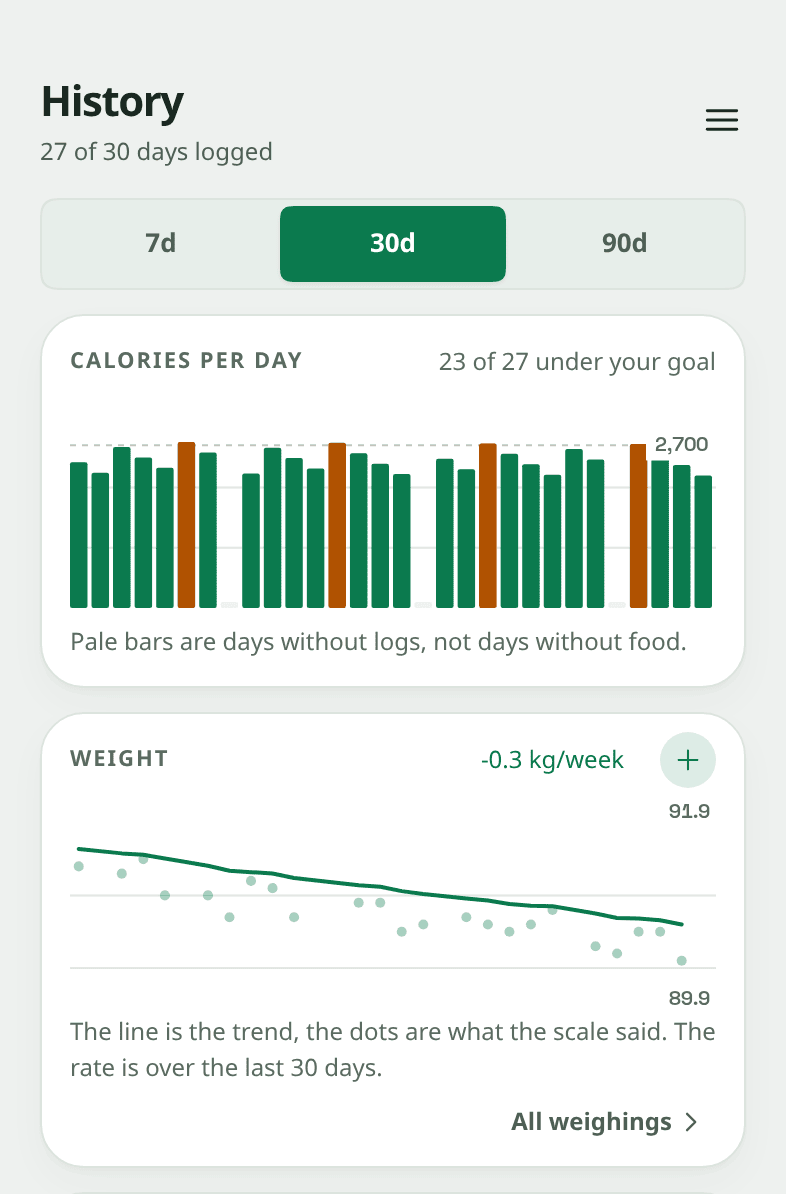
The dots are what the scale said. The line is what is actually happening.
Weigh yourself two mornings in a row and you can be two kilos apart without a thing having changed. Salt, water, what you ate last night, which hour you stood on it. A chart of the readings as they came mostly shows those swings, and the swings are bigger than the change you are looking for.
- The line is a weighted average, and recent days count for more. Each weighing moves the line about a tenth of the way towards itself, so one heavy morning moves it only a little, and two weeks of them move it a lot. It is the same kind of filter The Hacker's Diet used, and the research page has the studies on why the raw readings need one.
- Gaps are counted in days, not in readings. Weigh yourself on Monday and again three weeks later and the second reading counts for more than a reading from Tuesday would have. Most trackers cannot tell those two apart, because they average readings rather than time.
- The rate is given in kilos per week, because that is the number that means something. A kilo a week is fast enough to cost you muscle; half a kilo is a sensible limit for most people. The figure on the card is worked out from the line, over the last thirty days.
What you type stays
Four rules about which number is kept, and they come down to the same thing: a sync that quietly overwrites what you typed is worse than no sync at all.
- A weight you typed is never overwritten. Correct a day by hand and the next sync leaves it alone, for good. That is the difference between a correction that stays and one that vanishes the next time you open the app.
- The earliest reading of the day is the one kept. Weight swings a kilo and a half over a day on food and water alone, so the morning one is the one that compares with yesterday morning. Stand on the scale again after dinner and it changes nothing.
- A reading is filed by the day you took it. Not by the clock the server uses. A weigh-in at half past one in the morning in Brussels is still the day before on that clock, and it would otherwise land on the wrong bar of the chart, one day away from the meals it belongs beside.
- One odd reading does not stop the rest. Apple Health and Health Connect are shared, and other apps write into them. Somebody else standing on your scale, or a suitcase, is a number Snapkin skips, not a reason for the sync to quietly stop working.
Steps and active energy stay on the phone
The same permission that reads your weight also reads those two, and they are treated completely differently.
They never leave your phone.
They are not stored on the server, so there is nothing to delete later. They are read on the phone, drawn on the card next to your calories, and that is as far as they go. An automatic check fails if the part of the app that talks to the internet can so much as reach the part that reads them.
They never move your calorie target.
This is the most-asked-for thing Snapkin says no to. Across 82 studies the Apple Watch's error on calories burned runs from 9.71% to 151.66%, and a day's calorie target that moves with a number that wrong is only as good as the worst reading the watch gives.
Your weight is the one that is sent, because the chart is on the server.
It is on your account, alongside your meals, so the trend is still there on a new phone. Nothing else the permission can see goes with it.
Weigh yourself once and watch the line
It's that simple. It keeps working through restaurants, holidays and busy weeks, because there is nothing else to keep up with.
€14.99 a month or €99.99 a year, billed by the store, cancel there any time.